Новая функциональность
Страница соединения с Telegram-ботами
Страница отображает все существующие подключения к Telegram-ботам. Это позволяет создавать нескольких ботов под разные задачи и аудитории пользователей. Подробнее читайте в документации.
Создание группы в Telegram для решения значительных инцидентов
Значительным называют инцидент, который приводит к существенным рискам для бизнеса по количеству затронутых пользователей и клиентов, к проблемам с информационной безопасностью и другим возможным рискам. Для устранения такого инцидента необходимо быстрое реагирование и начало работ.
В новой версии ITSM появилась возможность автоматически создавать группы в Telegram для решения значительных инцидентов – сворминг-сессии.
Сворминг – методика привлечения всех возможных специалистов по проблеме для диагностики и проработки конкретного решения по задаче.
На форме записи значительного инцидента доступна кнопка Начать сворминг/Start swarming. Она открывает модальное окно с полем пользователей, которым придет уведомление на почту со ссылкой на Telegram-группу. По умолчанию в поле указаны:
- менеджер инцидентов;
- владелец связанной услуги;
- ответственный за задачу пользователь;
- пользователь, который инициировал создание сворминг-сессии.
При необходимости можно удалить кого-то из пользователей по умолчанию или добавить новых.
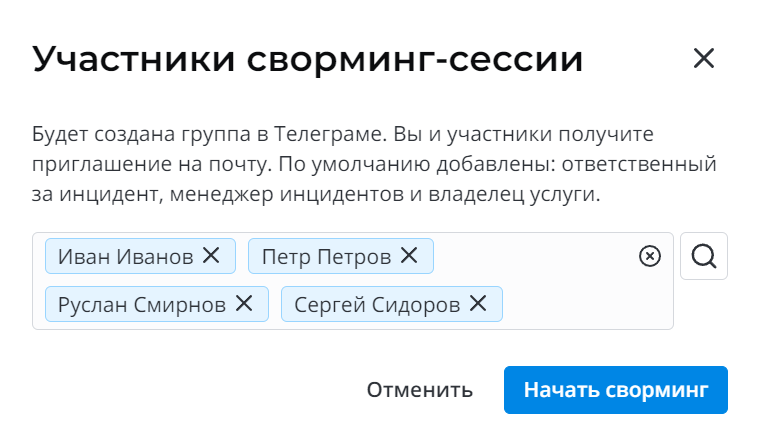
После получения уведомления, пользователи могут присоединиться к группе, в чате Telegram-бот отправляет сообщение с информацией по значительному инциденту, для которого была создана сворминг-сессия.
Ссылка на группу также доступна на форме инцидента для других заинтересованных участников.
Все комментарии и изменения в инциденте будут дублироваться в группе сессии, а комментарии из Telegram-группы в рабочие заметки инцидента от лица Guest User, но с указанием имени пользователя, отправившего сообщение в Telegram.
Для предварительной настройки создания группы в Telegram следуйте инструкциям, описанным в документации.
Улучшения
Инфраструктурные инциденты
Чтобы создание значительных инцидентов соответствовало процессу Управления инцидентами, изменили поведение атрибутов Инфраструктурный инцидент/Infrastructure incident и Значительный инцидент/Major incident на форме записи в разных статусах.
- После изменения статуса инцидента из Зарегистрирован/Registered, флажок Инфраструктурный инцидент/Infrastructure incident доступен только для чтения.
- Только инфраструктурные инциденты могут быть отмечены как значительные.
- Инфраструктурный инцидент можно отметить как значительный в любом статусе.
Форма инцидента и пользовательского вопроса на портале
На портальную форму создания инцидента и пользовательского вопроса добавили виджет вложений.
ITSM сущности
На формы инцидентов, запросов на обслуживание, запросов на изменение и проблем добавили связанные списки внешней и внутренней спецификаций.
Сервисная спецификация – набор документов, которые необходимы как для пользователей услуги, так и для специалистов, предоставляющих услуги. Подробнее о спецификациях можно прочитать в документации.
Добавили бейджики для индикации важной информации:
- Флажок Требует внимания/Attention required на формах инцидентов, запросов на обслуживание, проблем.
- Значительный инцидент/Major incident и бейджи родительского и дочернего инцидента.
- Стандартное/Standard, Нормальное/Normal, Экстренное/Emergency и опции поля Риск/Risk на формах запросов на изменение.
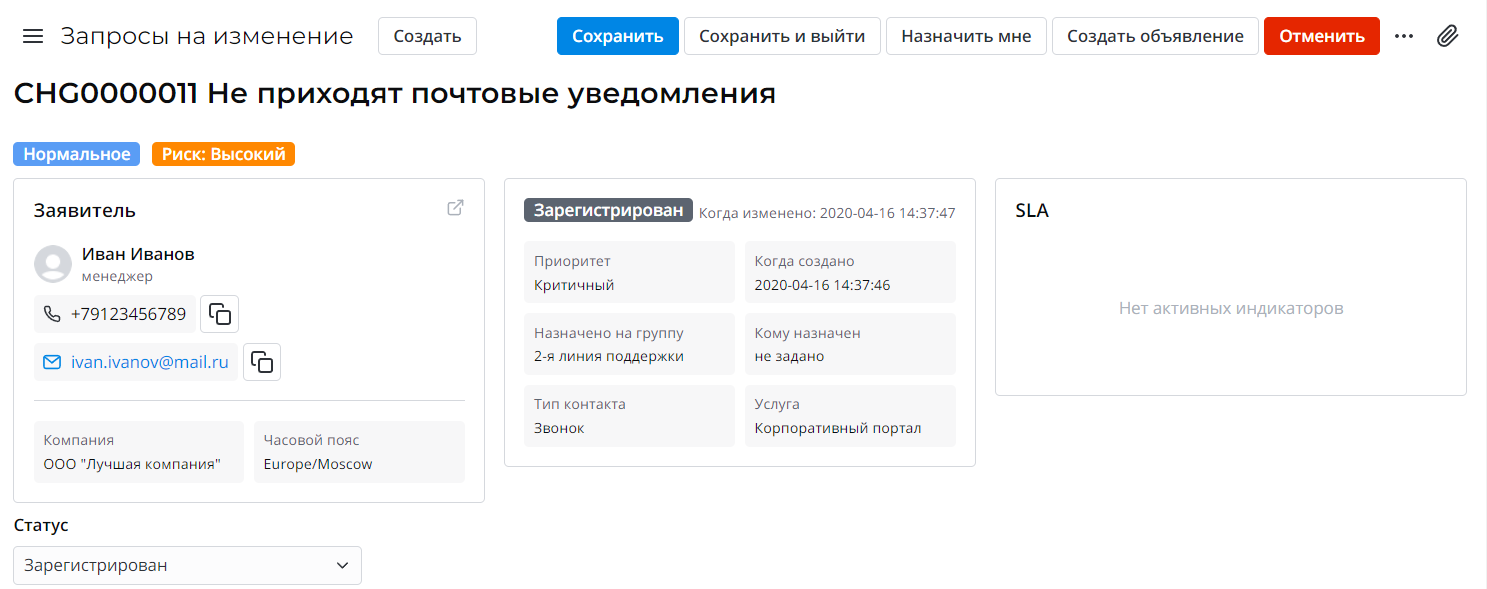
Добавили виджет Timeline на формы сущностей, а также заменили виджеты Static User Information и Static Task Information обновленными версиями, вышедшими в платформе 1.16.0, которые позволяют управлять составом ячеек через опции.
Виджет SLA
По умолчанию виджет индикаций SLA теперь ориентируется не на астрономически затраченное время (поле Затрачено астрономически времени/Astronomical time elapsed), а на затраченное рабочее время (поле Затрачено рабочего времени/Business time elapsed).
Источник времени можно переключить в опциях экземпляра виджета.
Исправления
DEF0016453: При создании колонок целевой таблицы источника мониторинга добавлена валидация, которая проверяет, что наименование колонки не начинается с символа нижнего подчеркивания ( _ ). На 4 шаге при трансформации все двойные нижние подчеркивания заменяют на одно.
DEF0016411: На портальных страницах обращений теперь отображаются только обращения, созданные текущим пользователем.
DEF0016212: В статусах Отложен/Postponed, Требуются уточнения/Information needed, Внешняя обработка/External processing и Отклонено пользователем/Refected by user на форме запросов на обслуживание поле Дополнительный комментарий/Additional comment обязательно для заполнения.
DEF0016207: Таблицы Проблемы/Problems и Задачи проблем/Problem Tasks добавлены в группу поиска, чтобы по записям работал контекстный поиск в агентском интерфейсе. Проблемы и запросы на изменения не отображаются в поиске на портале.
DEF0016158: Поле Номер/Number записи события мониторинга теперь уникально. Благодаря этому поиск по записям и работа с ними стали удобнее.
DEF0016102: При формировании ссылки уведомления в Telegram-бот учитывается портальный контекст.
DEF0016060: Поправлена верстка шага 1 настройки источника мониторинга.
DEF0015936: При отмене запроса на изменение через модальное окно на форме, код закрытия копируется в соответствующее поле секции Информация о закрытии/Closure Notes, статус запроса меняется на Завершен/Completed.
DEF0015927: Ссылка на записи в уведомлениях Telegram-бота теперь формируется корректно.
DEF0015901: Страница просмотра задачи View Task недоступна пользователям, у которых нет прав просмотра записей задач. Если пользователь без доступа перейдет по прямой ссылке, то его перенаправит на страницу 403 ошибки.
DEF0015481: Теперь статус проблемы Закрыта/Closed является конечным, нельзя из него перевести проблемы в статус Известная ошибка/Know error.
Переводы: Добавлены недостающие и откорректированы существующие переводы системных элементов для улучшения качества продукта и удобного взаимодействия с ним.