Новая функциональность
Перенаправление пользователей на портале
После регистрации инцидента пользователь автоматически перенаправляется на форму просмотра созданной записи на портале.
После регистрации пользовательского вопроса пользователь увидит общую информацию о процессе дальнейшей обработки его вопроса.
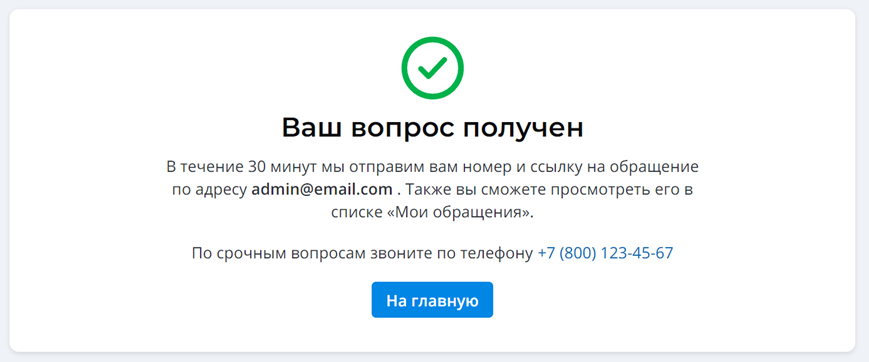
Информационное сообщение можно будет поменять. Подробнее о том, как это сделать читайте в документации.
На формах создания вопроса и инцидента при выборе значения Очень высокая/Very high в поле Срочности/Urgency отобразиться сообщение с важной информацией, например, с номером телефона, по которому заявитель может связаться с агентами для подтверждения информации.
Виджет срочности
На портале заявитель может менять срочность после создания инцидентов или запросов на обслуживание. Для этого на форме просмотра открытого обращения во всех статусах, кроме Завершено/Completed и Закрыто/Closed) добавили соответствующий виджет.
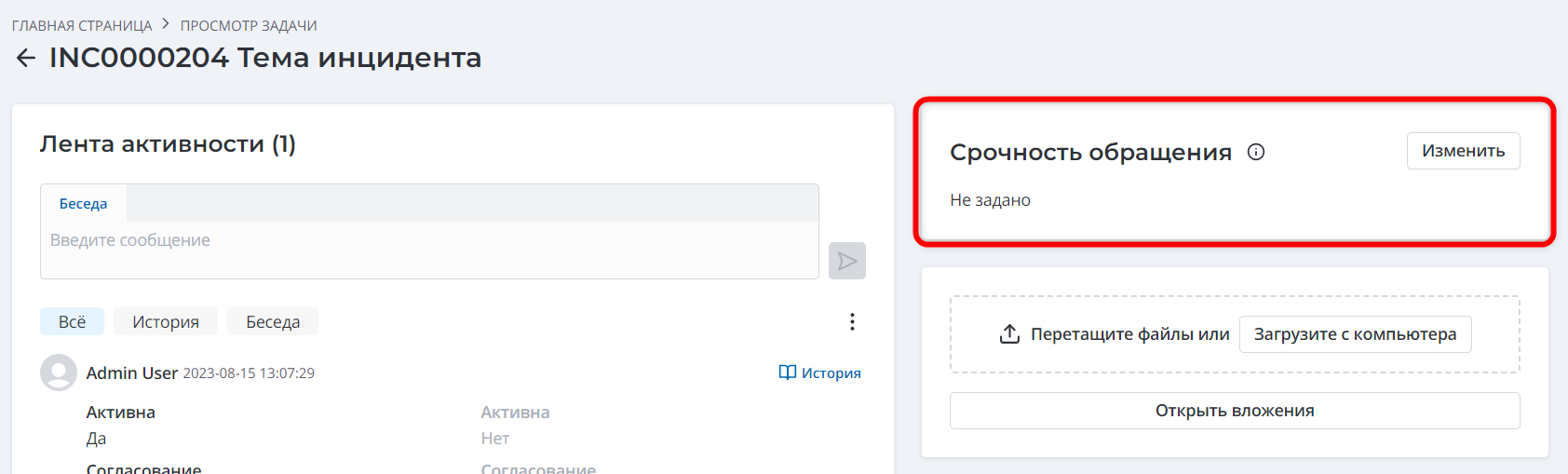
При повышении срочности до Очень высокая/Very high заявитель увидит сообщение с важной информацией, например, с номером телефона, по которому он может связаться с агентами для подтверждения информации.
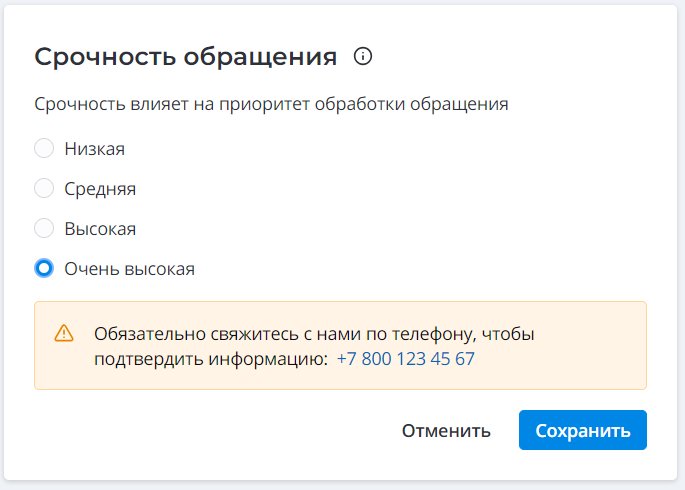
Виджет изменения срочности можно настроить. Подробнее об опциях читайте в документации.
Автоматическая архивация записей инцидентов и запросов на обслуживание
Настроили архивацию записей инцидентов и запросов на обслуживание, чтобы обеспечить неизменность данных закрытых обращений. Это позволит строить корректные отчеты и проводить полноценный анализ обращений.
С истечением дней, указанных в системных свойствах, инциденты (кроме инфраструктурных) и запросы на обслуживание будут переходить из статуса Завершено/Completed в Закрыто/Closed. Значение по умолчанию – 5 дней. Добавили также два новых системных свойства, в которых можно указать календарь для расчета этого периода времени.
Переход в статусы возможен, только если все связанные задачи инцидента или запроса на обслуживание находятся в статусе Завершено/Completed или Отменено/Canceled.
При изменении статуса инцидента или запроса на обслуживание связанные задачи в статусе Завершено/Completed переходят в Закрыто/Closed (кроме тех, что в статусе Отменено/Canceled).
После перехода в статус Закрыто/Closed, для всех ITSM сущностей и их задач:
- автоматически заполняется поле Закрыто в/Closed at. Оно доступно только для чтения.
- снимается флажок Активно/Active. Только пользователь с ролью admin может поменять значение.
- (для таблиц задач) все поля доступны только для чтения, только пользователь с ролью admin может редактировать значения.
При обновлении на версию 1.10 для таблицы Задач инцидентов/Incident Task появится статус Закрыто/Closed.
Изменения в управлении проблемами
- Обновили статусную модель проблем и известных ошибок. Подробнее смотрите в документации.
- Добавили новые и обновили существующие уведомления по проблемам. Список всех уведомлений также можно посмотреть в документации.
- Сделали обязательным для заполнения поля Описание/Description на форме проблем и Услуга/Service на форме известной ошибки во всех статусах, кроме Черновик/Draft и Удалена/Retired.
- Теперь только пользователи с ролью problem_manager или admin могут перевести проблему в статус Закрыта/Closed.
- Известная ошибка автоматически переходит из статуса Актуальная/Actual в Исправлена/Fixed, когда связанная проблема закрыта с кодом – Решено: 1/2 линией / Solved 1st/2nd level. Также добавлен автоматический переход из статусов Актуальная/Actual, Исправлена/Fixed в статус Удалена/Retired, когда связанная проблема закрыта с кодом Не решено (невозможно решить/создано ошибочно) / Not solved (Dropped/Refused).
Уведомления по запросам на изменение
Добавили уведомления, которые будут отправляться при переводе запросов на изменение в статус Завершено/Completed и оповещать о коде закрытия.
Уведомления будут получать: менеджер изменений, заинтересованные лица и люди, которые подписались на отслеживание изменения.
Тема писем будет содержать код закрытия, чтобы получатели сразу видели результат проведения изменения.
Обновили также опции самих кодов:
| Было | Стало |
|---|---|
| Внедрено/Implemented | Внедрено/Implemented (без изменений) |
| Внедрено частично/Partially implemented | Внедрено частично/Partially implemented (без изменений) |
| Откат изменений/Backout | Не внедрено (Откат)/Not implemented (Rollback) |
| * Не внедрено/Not implemented |
- Отменно/Cancel|Не внедрено (Отменено)/Not implemented (Canceled)|
Задачи инцидентов и запросов на обслуживание
Добавили правила уведомлений для таблиц Задачи инцидентов/Incident Task и Задачи запросов на обслуживание/Request Task:
- когда на задачу назначен пользователь, он получит соответствующее уведомление.
- когда на задачу назначена группа, все ее участники получат соответствующее уведомление.
- когда на задачу назначены группа и пользователь, только пользователь получит соответствующее уведомление.
- при закрытии задачи уведомление отправляется агенту, на которого назначен связанный инцидент или запрос на обслуживание.
Улучшения
Виджет Ленты активности с полем Рабочие заметки/Work notes отображается на формах всех сущностей ITSM и их задач.
- Поле Беседа/Discussion отображается в ленте только на формах инцидентов (кроме инфраструктурных) и запросов на обслуживание.
ITSM_agent не может оставлять комментарии в Рабочих заметках, когда сущность находится в статусе Закрыто/Closed.
Для удобной совместной работы агентов над задачами, агент, который не является назначенным пользователем, может:
- заполнять поля Статус/State*, Кому назначено/Assigned user, Назначено на группу/Assignment group, редактировать поле Отслеживающие/Follower list и оставлять рабочие заметки на формах инцидентов и запросов на обслуживание.
- заполнять поля Статус/State*, Кому назначено/Assigned user, Назначено на группу/Assignment group, редактировать поле Отслеживающие/Follower list и оставлять рабочие заметки на формах задач ITSM сущностей.
- оставлять рабочие заметки на формах ITSM сущностей без заполнения обязательных полей.
*Агенту потребуется оставить рабочую заметку при изменении статуса.
На формах задач сущностей убрали вкладку Информация о закрытии/Closure Information. Результаты работы по задачам отображаются в рабочих заметках.
У задач запросов на обслуживание и проблем также убрали вкладку Расписание/Schedule.
Для родительских сущностей (инцидента, проблемы, запроса на обслуживание или изменение) в статусе Завершено/Закрыто / Completed/Closed поля вкладки Информация о закрытии/Closure Information обязательны для заполнения.
Заявитель/Caller, у которого есть доступ к записям обращений в агентском интерфейсе, не может редактировать значения полей, но может оставлять комментарии в поле Беседа/Discussion.
Исправления
DEF0016059: На портале длинные темы обращений адаптируются и переносятся в зависимости от размера экрана пользователя.
DEF0016520: Поле Фактический простой/Actual downtime становится необязательным для заполнения и доступным только для чтения при переходе запроса на изменение в статус Завершено/Completed.
DEF0016546: Обновили тексты и верстку модального окна создания запроса на изменение из пользовательского вопроса.
DEF0016836: Вложения из электронного письма автоматически добавляются во вложения создаваемого пользовательского вопроса.
DEF0017990: Инцидент или запрос на обслуживание по наступлению даты возобновления работ переходит из статуса Отложено/Postponed в Назначено/Assigned.
DEF0018006: В уведомлениях содержимое текстовых полей отправляется с переносами.
Переводы: Добавлены недостающие и откорректированы существующие переводы системных элементов для улучшения качества продукта и удобного взаимодействия с ним.