В этой версии мы расширили возможности модуля авторизации: добавили возможность одновременного использования разных сервисов авторизации, обновили алгоритм поведения системы при вводе учетных данных, что сделало его более безопасным, и добавили политики управления сложностью пароля и количеством попыток. Также мы реализовали новый виджет авторизации, который поддерживает эту функциональность.
Кроме того, мы сделали просмотр и считываемость информации более удобным. Для этого:
- добавили режим компактного просмотра форм, в котором на странице отображается больше информации и минимизируется необходимость прокручивать страницу вниз.
- добавили разделители разрядов числовых значений, вид которых можно настроить для каждого языка.
- обновили вид профиля сотрудника на портале самообслуживания.
Важным улучшением для пользователей сервисной составляющей платформы в этой версии стала возможность использовать признак VIP записи Заявителя в отчетах.
Также обновление содержит ряд системных улучшений и исправлений, направленных на повышение безопасности и улучшение общей логики системы.
Новая функциональность
Числовые разряды в полях, Simple-тегах и Ленте активности
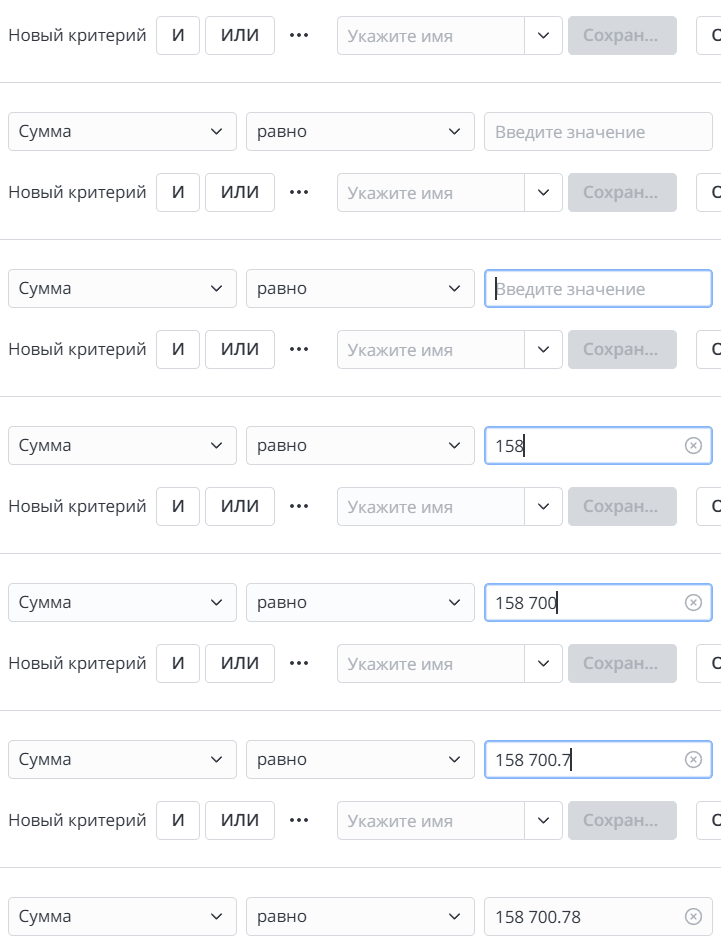
В этой версии платформы мы оптимизировали отображение больших целых и нецелых чисел для удобства просмотра информации. Для этого мы реализовали несколько вариантов разделителей для разрядов и дробных частей числовых значений, которые, в том числе, учитываются системой при настройке конструктора условий, а также при отображении в ленте активности.
Отображение разделителей включается с помощью нового системного свойства simple.number.enable_grouping_separator. При необходимости вы можете настроить разные виды отображений для каждого используемого языка интерфейса. По умолчанию: для русского языка применяется вид 1 000,25, для английского – 1,000.25. Также в настройках языка вы можете настроить пробел в качестве разделителя разрядов, в этом случае числовые значения будут иметь следующий вид 1 000,25 или 1 000.25.
Также в Simple-теге string появился атрибут enableGroupingSeparator, который позволяет включать и отключать отображение разделителей числовых значений, добавленных в текстовое поле внутри Simple-тега. Значение этого атрибута имеет приоритет над системным свойством.
К некоторым типам колонок разделители не применяются, в том числе разделители не применяются к колонкам типа sys_id.
Читайте подробнее Другие свойства →
Компактный режим просмотра записей
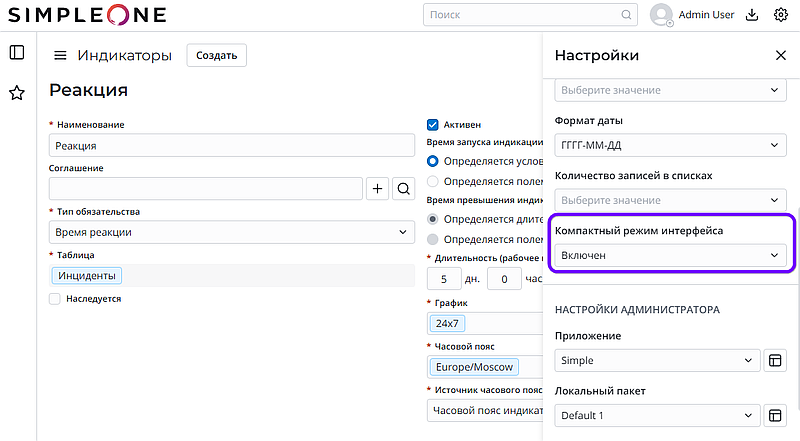
Мы добавили опцию компактного размещения всех полей на одной странице. Переключить режим отображения на Компактный можно в меню Настроек. В этом режиме все заголовки и отступы полей форм уменьшены, благодаря чему на странице отображается больше информации, чем обычно.
Читайте подробнее Формы →
Возможности авторизации через сторонние провайдеры SSO
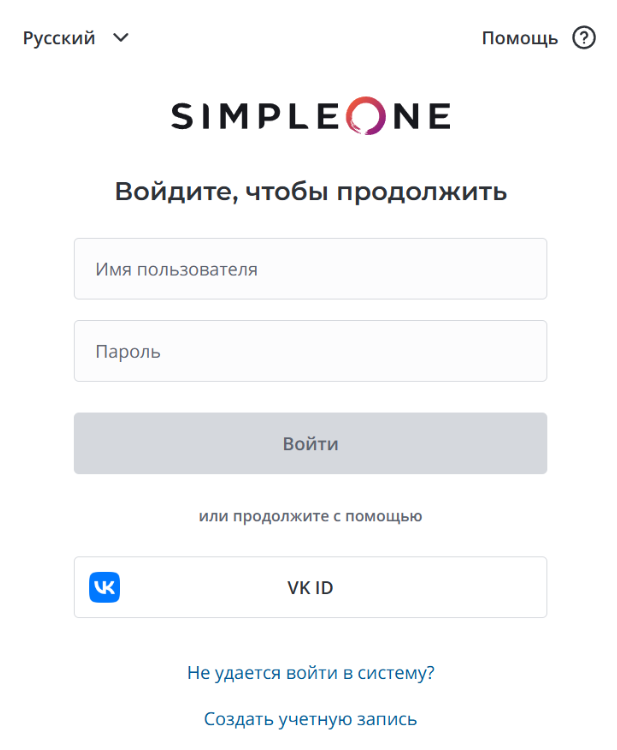
В этой версии мы добавили возможность одновременного использования разных провайдеров авторизации. Теперь пользователи могут сами выбирать способ авторизации: используя базовую авторизацию или подключенного стороннего провайдера. Для этого в системе появились:
- таблица Провайдеры SSO (sso_provider), которая позволяет создать записи провайдеров для авторизации в системе, а также настроить вид отображения на форме виджета авторизации.
- обновленный виджет авторизации, на форме которого отображаются кнопки для авторизации удобным для пользователя способом. Количество и вид отображения кнопок можно настроить.
Читайте подробнее Провайдеры SSO →
Настройка политики пароля
Настройки авторизации в этой версии стали более гибкими: теперь они позволяют установить количество допустимых последовательных попыток авторизации в заданный период времени, а также периоды задержки авторизации после превышения установленного числа их попыток.
Читайте подробнее Настройки сброса пароля →
Новый класс серверного API SimpleSystem
В версии платформы 1.28.0 мы продолжили повышать безопасность системы и ввели новый класс SimpleSystem серверного API. При работе с этим классом, система проверят, имеет ли текущий пользователь роль admin.
Читайте подробнее SimpleSystem →