Расширение SimpleOne API для Visual Studio Code предоставляет подсказки при наведении, автодополнение и подсветку синтаксиса для классов и методов клиентского и серверного API SimpleOne при редактировании JavaScript-файлов.
Ассоциация скриптов с типами API
Для работы с расширением, необходимо создать ассоциации скриптов с конкретным типом API (клиентский или серверный). Для этого достаточно открыть любой JS-файл после установки расширения и выбрать в появившемся окне ассоциацию для папки с этим файлом. Ассоциации задаются для всех файлов в папке, поэтому рекомендуем хранить скрипты разных типов в разных папках.

В дальнейшем ассоциацию можно изменить при помощи пункта Associate Folder контекстного меню папки.
Вы также можете добавить комментарий «//server» или «//client» в первую строку отдельного JS-файла, чтобы связать его с соответствующим типом API. Такая настройка будет иметь приоритет перед ассоциацией, заданной для папки, в которой хранится файл.
Подсветка синтаксиса и подсказки
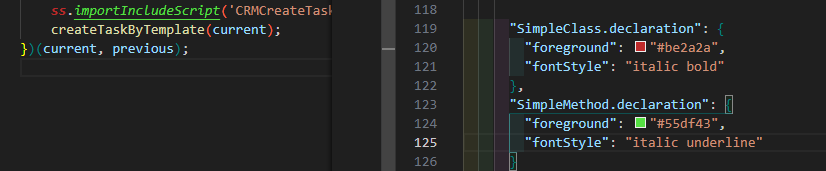
Расширение добавляет подсветку классов и методов API SimpleOne в JS-файлах.
Стили подсветки можно переопределить в файле settings.json:
Также подсветку можно полностью отключить в настройках IDE:
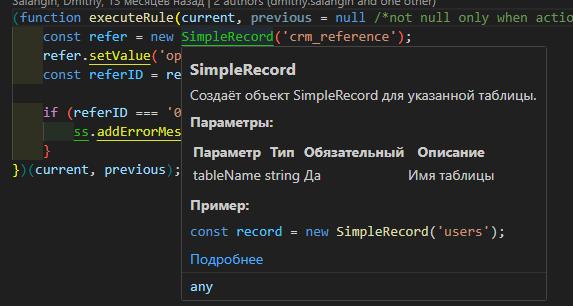
При наведении на метод или объект API появляется подсказка с краткими сведениями и ссылкой на соответствующую статью в документации:
Автодополнение
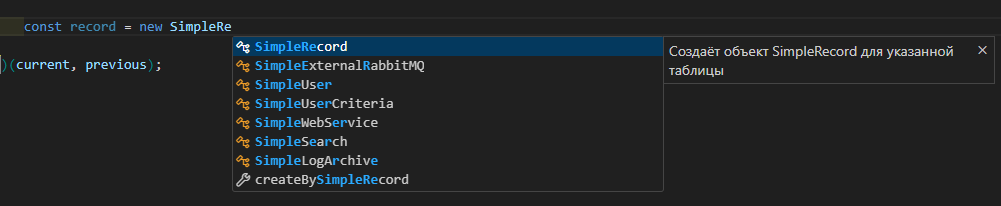
При написании скрипта расширение предлагает классы и методы API SimpleOne в списке автодополнения, а также отображает подсказку с кратким описанием:
Найти расширение можно прямиком из IDE по ключевым словам, либо скачать с маркетплейса.
5 лайков
Добрый день!
Прошу рассмотреть возможность внесения изменений в
- изменить/доработать проверку ассоциации файла с помощью комментариев (//server, //client)
У нас, к примеру, используется первой строкой комментарий с мета данными и это ломает структуру проекта. Учитывая ваш код проверки, мы могли бы добавить в нашу мету ваш комментарий ассоциации, но он если в нашей мете есть слово client, то несмотря на то, что скрипт серверный, он всё равно будет клиентским, пример
/* type: server, metadata: sys_id=169088642802415187; name=Get client Id; application=Simple */
Код вашей проверки
const firstLine = document.lineAt(0).text.trim();
if (/^(\s*//|\s*#|\s*/*)/.test(firstLine)) {
if (firstLine.includes(“client”)) return “clientSideAPI”;
if (firstLine.includes(“server”)) return “serverSideAPI”;
}
В общем и целом под эту проблему мы адаптировались и нашли решение, но если можно продумать другой способ проверки (более универсальный), то было бы здорово.
- Всплывающее окно подсказки при открытии файла. Очень прошу это исправить, это очень мешает. Каждый раз при смене ассоциации при открытии файла появляется окно подсказки.
Ваш вызов
setTimeout(() => {
vscode.commands.executeCommand(“editor.action.triggerSuggest”);
}, 100);
Пример, работаю с серверным файлом, перехожу в клиентский - открывается окно, перехожу обратно - опять окно. Открываю любой файл без ассоциации, например конфиг, возвращаюсь к серверному скрипту - опять окно.
Если это кому-то нужно, то добавьте, пожалуйста, переменную для возможности отключения этого функционала, аналогично переменной simpleSemantic.enabled
Спасибо!
1 лайк
Спасибо за обратную связь , запланируем задачу на устранение проблем \ доработку решения
Будем держать в курсе!
1 лайк
Не особо понимаю, но зачем нужно очередное расширение для vscode с подстветкой и по сути около jsdoc, его практическая польза около нулевая, не судите строго, я поясню  Гораздо проще и полезнее — написать файлы деклараций с jsdoc описанием, подключить typescript, создать tsconfig с references на tsconfig.client.json и tsconfig.server.json, с указанием в incude соответствующих директорий/файлов. Это не то, что даст нативную (!) подсветку и
 intellisense, но и огромным бонусом предоставит проверку типов, а там как уже душе угодно строгость настраивать.